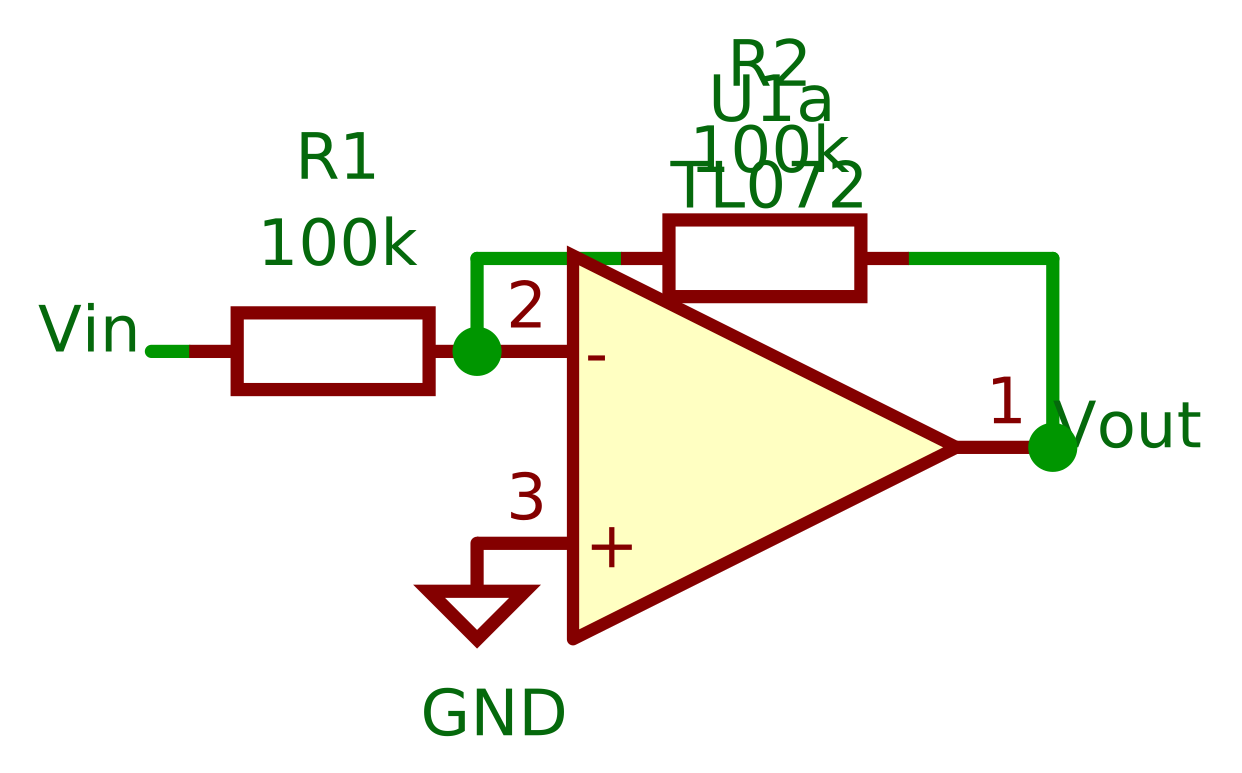
Schema
The recad.Schema module allows for drawing circuits. The drawing follows the basic structure containing pre-defined elements for use in a drawing. A common import structure is:
from recad import Schema
- class recad.Schema(project, library_path=None)
The Schema
- recad.Schema.load(path)
Load a new Schema from a file.
- Parameters:
path – the file path
- recad.Schema.write(self, /, path)
Write a new Schema from to file.
- Parameters:
path – the file path
- recad.Schema.plot(self, /, **kwargs)
Plot a schema
- Parameters:
**kwargs – see below
- Keyword Arguments:
theme – the color theme.
scale – Adjusts the size of the final image, considering only the image area without the border.
border – draw a border or crop the image.
Example Usage:
 1from recad import *
 2
 3schema = Schema("test-project")
 4schema.move_to((50.8, 50.8))
 5schema = (schema
 6    + LocalLabel("Vin").rotate(180)
 7    + Wire().right()
 8    + Symbol("R1", "100k", "Device:R").rotate(90)
 9    + Junction()
10    + Symbol("U1", "TL072", "Amplifier_Operational:LM2904").anchor("2").mirror("x")
11    + Junction()
12    + Wire().up().length(5)
13    + Symbol("R2", "100k", "Device:R").rotate(270).tox("U1", "2")
14    + Wire().toy("U1", "2")
15    + Symbol("GND", "GND", "power:GND").at("U1", "3")
16    + LocalLabel("Vout").at("U1", "1")
17)
18
19schema.plot(path = 'docs/_static/schema_opamp.svg', scale = 10)